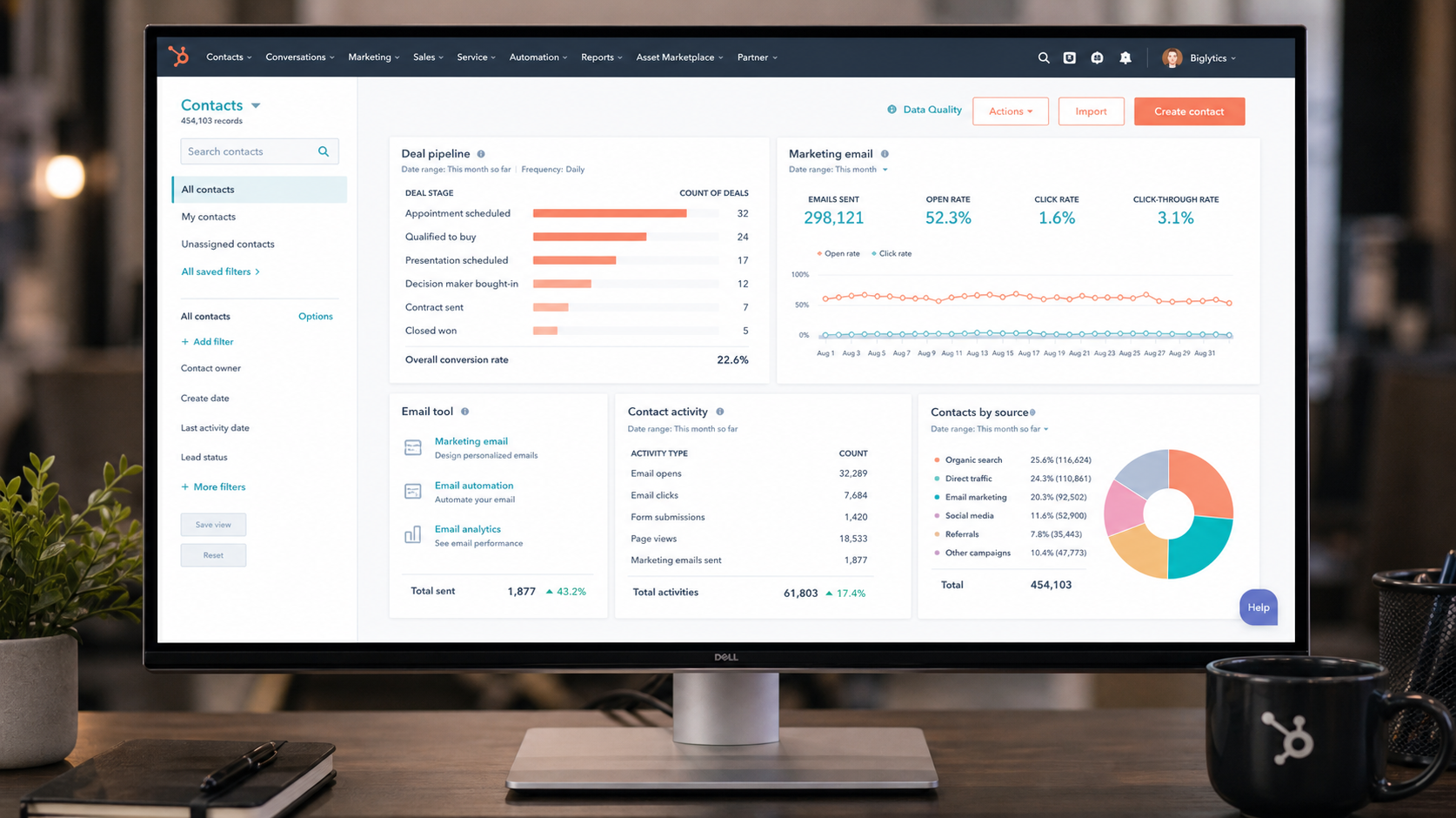
What is HubSpot?
HubSpot is an all-in-one customer platform combining CRM, marketing automation, sales, and customer service tools. Unlike point solutions, it's designed so a company can start with the free CRM and grow into the paid hubs as needs expand — without migrating to a different system.
Its biggest advantage in 2026 remains the integration between marketing, sales, and service. Leads captured by marketing automatically flow into the sales pipeline, and customer data is consistent across every team.
How We Tested
- Ran it as our full CRM and marketing hub for a month
- Tested the free CRM, Marketing Hub, and Sales Hub
- Imported a lead list and ran email + landing page campaigns
What We Loved
Pros
- Best free CRM available
- Marketing + sales + service in one
- Excellent lead capture & tracking
- Easy for non-technical teams
- Huge integration marketplace
Cons
- Gets expensive as you scale
- Advanced features gated by tier
- Some features have usage limits
- Reporting can feel basic at low tiers
Pricing
- Free CRM: Contacts, deals, pipelines, forms — genuinely useful at $0
- Starter ($20/month): Marketing + Sales basics, email, pipelines
- Professional ($800+/month): Advanced automation, full reporting
HubSpot's pricing tiers jump significantly. The free CRM and Starter are great value; the jump to Professional is where it gets expensive. Plan for the tier you'll need in 12 months, not just today.
Who Should Use It
Perfect for: small to mid-sized businesses, marketing-led companies, and teams that want one platform instead of five disconnected tools.
Not ideal for: tiny startups that just need a simple pipeline (overkill), or large enterprises needing deep customization and mature reporting at scale.
Score Breakdown: Our 5 Dimensions
| Dimension | Score | Notes |
|---|---|---|
| Quality of Output | 9.0 | Mature automation and content tooling |
| Ease of Use | 9.2 | The easiest powerful CRM to onboard |
| Value for Money | 8.6 | Strong free tier; paid gates climb |
| Speed & Reliability | 8.8 | Stable platform, fast search |
| Support & Docs | 8.9 | Academy, community and support are best-in-class |
| Overall | 9.0 | Weighted across 4 weeks of daily use |
Performance in Daily Use
The free tier carried our 40-deal test pipeline without gating essentials: contact records, deal stages, email tracking and meeting scheduler all functioned at production level. Search across 10k contacts returned in under a second.
The 2026 AI layer (prospect agent, content agent) is competent at drafting and enrichment — the prospecting agent’s researched first drafts needed edits but started from real data.
Integrations & Ecosystem
1,500+ app marketplace, native Gmail/Outlook sync, and the deepest CMS pairing in the industry (website + CRM sharing one data model). For teams on Microsoft or mixed stacks, third-party sync costs add up — factor that into TCO.
Support & Documentation
HubSpot Academy remains the gold standard for onboarding (free certifications), the community forum resolves most edge cases, and paid-tier support is responsive with real specialists. Free-plan support is limited to community and docs.
Reliability Notes From Long-Term Testing
A month of pipeline work through Hubspot showed the platform is dependable at its core job: records stayed consistent across devices and users, and the automation engine fired exactly as configured in our sequences. The friction we logged was data hygiene, not software — imports from legacy CRMs needed a cleanup pass, and duplicate detection caught most but not all of the mess.
Who Should Skip It
Skip Hubspot if your sales process is still being figured out — a sophisticated CRM amplifies a messy process rather than fixing it. Also think twice if you need deep offline access for field work, or if your team lives in spreadsheets and isn't ready to change; the migration tax only pays back once the team actually adopts the pipeline.
HubSpot vs Alternatives
| Quick Comparison | HubSpot | Pipedrive | Freshsales | |
|---|---|---|---|---|
| Best for | Hubspot (this review) | All-in-one marketing+sales | Simple visual pipelines | Built-in phone & AI scoring |
| Starting price | See pricing section | Free / from $20 | from $14 | Free / from $9 |
| Standout | See our verdict | Ecosystem & free tier | Ease of use | Value at entry |
Snapshot comparison — details and current pricing in the sections above and on vendor pages.
| Tool | Score | Price | Best For |
|---|---|---|---|
| HubSpot | 9.0 | $20/mo+ | All-in-one CRM + marketing |
| Attio | 9.0 | $29/seat | Modern, flexible CRM |
| Salesforce | 7.8 | $150/seat | Enterprise scale |
| Zoho CRM | 7.6 | $14/seat | Budget CRM |
FAQ
Is HubSpot's free CRM really free?
Yes — the free CRM includes unlimited contacts, deals, pipelines, forms, and basic email. It's genuinely usable at $0 and the best free CRM we've tested. You only pay when you upgrade to Marketing or Sales hubs.
Is HubSpot expensive?
It depends on your needs. Starter is affordable at $20/month, but the jump to Professional ($800+/month) is steep. For most SMBs, Starter plus the free CRM covers 80% of needs without the big price tag.
HubSpot vs Salesforce — which is better?
For SMBs and growing companies, HubSpot is easier to use and better integrated with marketing. Salesforce is more powerful and customizable but requires expertise and costs significantly more. Start with HubSpot unless you need Salesforce's enterprise capabilities.
Is HubSpot worth it for small teams?
The free tier is genuinely productive for 1-5 users (CRM, forms, email tracking, scheduler). Upgrade when you need automation, sequences or removal of HubSpot branding — Starter bridges that at ~$15-20/seat.
How does HubSpot’s AI compare to using ChatGPT directly?
HubSpot’s agents work inside your CRM data — drafts reference real contacts and deals without copy-pasting context. Raw ChatGPT is more flexible but requires you to supply the data. For CRM-grounded work, the built-in agents win on workflow.